Perfection
Perfection adds random stat bonuses to your Specialist (attack, defence, element, HP and more). You apply it with the Perfection tool in the Upgrade Manager, which consumes perfection materials.
Those materials are obtained from the Perfection Specialist NPC. Talk to it to open the Trader window, which has two tabs: convert your tokens/chests or your raid items into perfection materials.
Perfection Specialist (Trader)
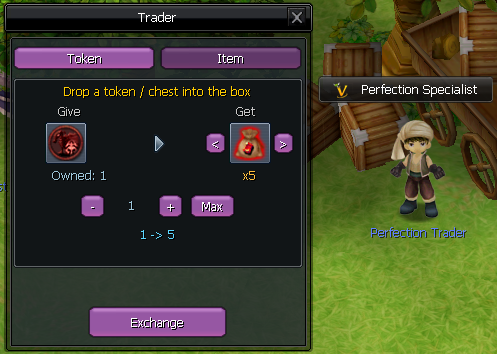
Drop a token or chest into the box. Every token is exchanged for 5 perfection materials. Set the amount with the - / + / Max buttons, then click Exchange.
How to use it
- Talk to the Perfection Specialist NPC to open the Trader window.
- Pick the Token or Item tab depending on what you want to trade in.
- Drop your token, chest or raid item into the box.
- Choose how many to convert with the - / + / Max buttons.
- Click Exchange to receive your perfection materials.
Once you have the materials, head to the Upgrade Manager and run the Perfection tool to roll new stats on your Specialist, up to 100 perfection.