Family System
Your Family grows by completing Family Quests. Every quest rewards Family Experience (FXP), and enough FXP raises your Family Level. Higher levels unlock permanent Family Buffs and let the Family Head buy powerful Family Bonuses from the Family Shop using Family Gold.
Open the Family window (default key J) and go to the Family Quest tab to track your objectives and claim rewards.
Family progress is shared by the whole family: everyone contributes FXP toward the same Family Level, and the bonuses apply to every member.
Family Quests
Everything lives in one place: Quests, Achievements and Rewards. Complete quests to earn Family Experience (FXP) and raise your Family Level. Switch tabs at the bottom, just like in the game.
- Quests: daily and monthly missions that reward FXP. Some require a minimum Family Level to unlock.
- Achievements: long-term goals that track a running total across the whole family; the elemental-boss chains also grant permanent Elemental Resistance bonuses.
- Rewards: the Family Bonuses your Family Head can buy with Family Gold, plus the activatable Experience/Gold boosts.
Family Level Buffs
When your family reaches a level milestone, the next tier of the permanent Family Boost buff is unlocked and automatically applied to every member. Click a buff icon to see its effects.
Click a buff to see its effects.
Family Bonuses can only be purchased by the Family Head, cost Family Gold, and are permanent (no refunds). The Experience Boost and Gold Boost are activatable buffs that last 1 hour and give +20% to family members (+10% to other players). The elemental Resistance bonuses are earned from the Achievements above, not bought.
Family Gold
Family Gold is the family's shared treasury, used to buy Family Bonuses from the Family Shop.
How to earn it
- Donations: members donate their own gold to the family bank (see below).
- Family activities: the family automatically earns gold from 1v1 PvP Arena and Glacernon / Family Raids.
The treasury has a maximum capacity; gold earned beyond the cap is not stored.
How to donate
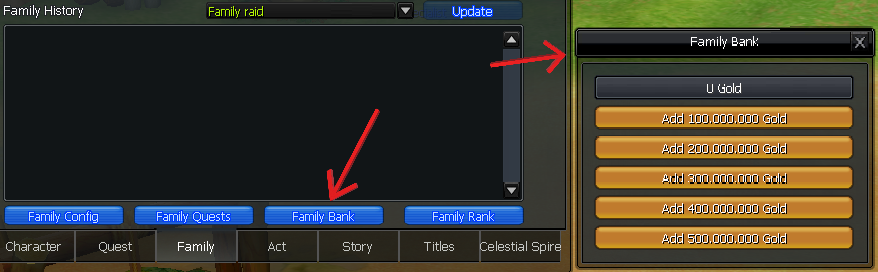
Open the Family window and click the Family Bank button, then pick how much to add: 100 / 200 / 300 / 400 / 500 Million Gold. The amount is taken from your own gold and added to the family treasury.